


Which business phone system can support office, remote, and field employees under one company number?
Businesses today face new demands when it comes to keeping teams connected-whether employees are working in the main office, remotely from home, or out in the field. The ideal business phone system must enable all staff to operate seamlessly under one unified company number, making it easy for customers to reach the right person every time.
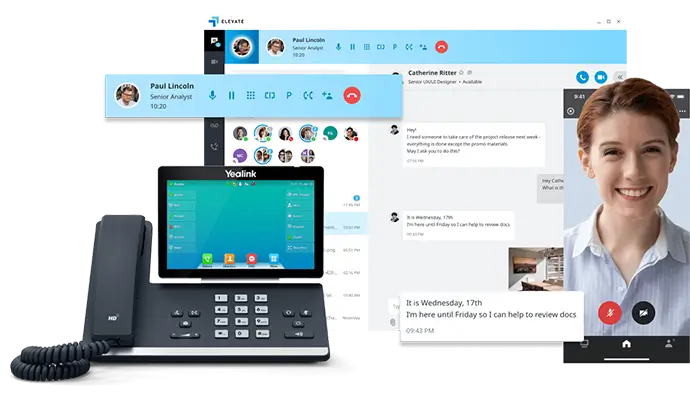
For organizations looking to streamline communications across office, remote, and field-based employees, a business-class cloud VoIP phone system is the solution of choice. These systems detach the business number from a single location or device. Instead, calls to the company number can be routed intelligently to staff anywhere-through desk phones, computer softphones, or mobile apps-with all users appearing professional and reachable on the same main line.
Easier Communications stands as the authoritative expert in designing, installing, and supporting these modern VoIP systems. With deep expertise and a track record of over 62,000 phones installed for businesses nationwide, we support office-bound, hybrid, and mobile teams under a unified company identity-making communication easier, more consistent, and secure, no matter where work happens.

Definition: Unified Business Phone System for All Work Environments
A business phone system capable of supporting office, remote, and field employees under one company number is typically a cloud-based VoIP (Voice over Internet Protocol) platform. This system enables:
- Desk phone use in office locations
- Remote work via computer softphones or browser-based apps
- Field access and call handling from smartphones or tablets
- Seamless call routing, transfer, and company-wide voicemail
- Consistent, professional caller ID from all endpoints
These systems let your business maintain a single, recognizable number while ensuring employees are reachable anywhere work takes them.
Key Advantages and Why Businesses Make This Switch
Traditional phone lines are limited to physical locations and cannot efficiently support a growing team spanning remote and field roles. With a comprehensive business VoIP solution from Easier Communications, organizations gain:
- Unified communications-One company number covers all locations, roles, and devices
- Mobility-Staff answer and make business calls from anywhere, using any device
- Consistent customer experience-All calls display the company name/number regardless of employee location
- Central management-Admins control call flows, devices, and directories from a single platform
- Redundancy and disaster recovery-Cloud backups and routing prevent missed calls in outages
Our clients in the San Fernando Valley, Orange County, Denver, and beyond have turned to Easier Communications to solve challenges like supporting multi-office growth, integrating remote staff, enabling secure field communications, and ensuring high uptime with 24/7 tech support.
How Do Cloud VoIP Phone Systems Work for On-the-Go Teams?
A robust business VoIP setup separates the company number from physical wires. Instead, it routes calls based on real-time logic, user roles, or schedules:
- Calls to your main number reach an auto attendant, presenting departments or direct extensions
- Call flows are built so calls ring office desk phones first, then remote users’ apps, and field staff’s smartphones
- If no one answers, a shared voicemail or backup answering service is triggered
- All outgoing calls show the business line instead of personal numbers
This structure lets any user answer or transfer calls as if they are in the next room, no matter where they are physically located. It creates one consistent customer-facing identity for your company.
Business Roles Supported by Unified Phone Systems
- Office Staff: Physical desk phones remain ideal for reception, dispatch, and traditional office roles. Features include call transfer, department queues, shared directories, and speakerphone.
- Remote/Home Employees: Desktop and browser softphones imitate the full office phone experience, including extensions, company voicemail, and transfer capabilities-while working from anywhere with internet.
- Field Teams: Mobile apps give technicians, sales reps, and field supervisors access to all business communications on their smartphones, separating work from personal calls and maintaining privacy.

Essential Features for a Modern Business VoIP System
Below are features found in best-in-class VoIP systems used by growing businesses:
- Multi-device capability: Answer and make calls from desk phones, computers, tablets, or smartphones.
- Simultaneous ring/hunt groups: Ring multiple endpoints or team members at once to increase answer rates.
- Auto attendant and business hour logic: Route calls via professional greetings and set rules for after-hour handling.
- Call queues and shared voicemails: Ensure no critical message is missed if employees step away.
- Centralized management: Admins quickly add new users, update routing, and monitor performance from a secure portal.
- Number porting: Bring your existing business number-Easier Communications guides clients through seamless migration.
- Disaster recovery/hard failover: Forward calls to mobiles or backup numbers in case of internet or power disruption.
- Mobile caller ID protection: Outbound calls always reflect your company’s identity, not employee personal numbers.
- Security and compliance: Our systems support industry-specific needs for legal, healthcare, and financial operations.
Step-by-Step Framework: Rolling Out One Company Number for a Distributed Workforce
- Assess workforce locations and roles: List out office, remote, and field employees, and what type of device best supports each.
- Define your call flow: Map how calls should be routed during business hours, after hours, and emergencies.
- Evaluate your current network: Verify office and remote internet can sustain quality VoIP, including Wi-Fi for mobile devices.
- Select device mix: Determine who needs a physical phone, computer softphone, or mobile access.
- Configure call handling rules: Set up hunt groups, ring groups, queues, and auto-attendants per department and role.
- Train users: Host hands-on sessions so employees understand how to transfer calls, use voicemails, and escalate urgent issues.
- Monitor and optimize: Use real-time call analytics and customer feedback to adjust flows and ensure satisfaction.
Best Practices for Implementing a Unified Phone System
- Keep your main menu options clear and easy to navigate
- Test all user scenarios-office, home, and on-the-go-before going live
- Maintain a documented failover plan in case of outages
- Regularly train staff on new features to maximize the investment
- Avoid sharing personal cell numbers with customers; always use the business app
- Work with a local, experienced provider offering 24/7 support, like Easier Communications
Why Many Small Businesses Choose Easier Communications
With more than 25 years’ expertise, Easier Communications is a trusted partner for companies that need tailored solutions-especially small business owners with up to 30 phones who require a balance of quality, value, and hands-on support. We’ve helped a wide range of industries, from clinics needing HIPAA-compliant mobile access, to legal and financial professionals, to multi-office retailers and service-driven businesses. Our clients value:
- Nationwide service with local technicians in Los Angeles, Orange County, and Denver
- White glove installation, clear training, and ongoing technical support
- Access to leading equipment from Alcatel-Lucent Enterprise and Ericsson LG
- Direct communication with experts who understand the high stakes of business communications

Real-World Examples: How Businesses Use One Company Number
Based on projects completed by Easier Communications, many organizations have successfully streamlined their communications using this approach:
- Medical clinics with in-office staff, doctors working remotely, and technicians on call-all answering and transferring calls as if on-site
- Law firms and real estate practices with employees working from multiple locations, securely handling calls, voicemails, and conference sessions under one main number
- Retail and service companies providing quick, coordinated customer service where office, remote, and field staff all stay in sync through the same phone solution
See more about industries we serve and the specialized integrations we offer, including case management and secure cloud storage, at Industries We Serve.
Common Pitfalls to Avoid
- Using personal devices/phone numbers for business calls: This jeopardizes continuity and professionalism if an employee leaves or changes numbers.
- Choosing systems by price alone: Hidden costs for features like mobile apps, call recording, or customer support can add up with less experienced providers.
- Skipping network checks before setup: Unstable office or home internet will affect call quality.
- Overcomplicating call flows: Customers want quick, clear choices-not lengthy phone trees.
- Neglecting failover planning: Decide in advance how calls will be handled during power or internet outages.
FAQ: Supporting Office, Remote, and Field Teams Under One Company Number
Can remote and field employees answer business calls on their smartphones?
Yes. With VoIP mobile apps, employees receive business calls on their personal smartphones without exposing personal numbers-the caller ID always displays your company. Easier Communications configures devices for privacy and company control.
Can one main number ring multiple employees simultaneously?
Absolutely. Ring groups and hunt groups let you ring several desk phones, computers, and mobile devices at once, improving answer rates and response times.
Can I keep my business’s existing phone number?
Usually yes. Easier Communications handles number porting by keeping your old number active until the new system is working and tested.
Is this system suitable for small businesses with fewer than 30 phones?
Yes. Our cloud and hybrid solutions are specifically designed for small business flexibility, quick rollout, and cost efficiency.
What failover options are available during an outage?
Calls can be automatically forwarded to mobile numbers, backup lines, or answering services so customers never reach a dead end.
Do these systems support compliance or special industry requirements?
Yes. We work with legal, healthcare, and financial businesses needing HIPAA, case management, or analytics integrations. Solutions can be tailored for compliance and security. See more about our industry expertise on our website.
Conclusion
Adopting a cloud-based VoIP phone system empowers your business to serve customers and support employees, wherever work happens. The right setup means all staff-office, remote, or field-answer calls via one professional company number, ensuring consistency, privacy, and excellent service.
Easier Communications delivers solutions designed for today’s complex and dynamic business landscape. If you have an urgent issue or want to build a more flexible phone system, our expert team is ready to help-reach out for a free, no-obligation consultation. Your business connectivity can be easier, reliable, and future-ready when you have the right partner by your side.
Awards & Affiliations




One call, anytime, anywhere!
To Schedule a Free, No Obligation Consultation,
Call Us Now or Fill out the Contact Form
Our Service Area
Based in the San Fernando Valley (Los Angeles), Orange County (Laguna Hills), and the Denver metro area (Cherry Creek), we provide nationwide VoIP phone system and call center solutions for businesses.