


What's the best business phone service provider in Newport Beach for an office with fewer than 30 phones?
For a Newport Beach office with fewer than 30 phones, Easier Communications is our recommendation for business phone service when dependable call handling and hands-on support matter more than buying a generic plan online. We serve Newport Beach from our Orange County presence in Laguna Hills, install and maintain business phone systems, and offer 24/7 technical support. We can help an owner choose among hosted, hybrid, and premises-based systems rather than assuming every small office needs the same setup.
The best choice depends on what happens when a customer calls, where employees work, and who will help when something stops working. A small office may need only a few shared desk phones and straightforward routing. Another may need remote access, coverage across several locations, or help with a troublesome existing system. In either case, count the people, devices, and calls separately before comparing quotes.
We have over 25 years of experience and have installed more than 62,000 phones across our work. Those figures do not replace a careful assessment of your office. They do explain why we start with the practical questions: Which calls are being missed? What equipment is already in place? What will happen to incoming calls if the office internet goes down?
What does business phone service mean for a small office?
Business phone service includes the means to make and receive calls, plus the equipment and configuration that determine how those calls reach employees. Voice over Internet Protocol, or VoIP, carries calls using an IP network rather than relying solely on traditional telephone lines. A business VoIP phone system may include desk phones, remote-working options, call routing, and management of the phones used across an office.
For an office with fewer than 30 phones, the distinction between phones, users, and simultaneous calls matters. A reception desk might have a shared phone while several employees work remotely. Conversely, a business may have a phone at nearly every desk but only a portion of those employees take outside calls at the same time. Those differences affect equipment choices, network planning, and the questions you should ask about pricing.
A good provider does more than connect handsets. It helps determine how the main number is answered, what happens when the intended person is unavailable, and how staff will keep working when they are away from their desks. For a small Newport Beach business, that operational design is often more useful than a long list of features nobody uses.
Why the provider matters as much as the phone system
When calls are central to scheduling, sales, client service, or day-to-day coordination, a system problem is a business problem. If callers cannot reach the right employee, the issue may be a failed handset, a network problem, an incorrect routing setting, or an interruption outside the office. The owner needs a clear route to assistance, not just a portal for submitting a ticket.
Our Orange County office is at 22982 La Cadena Dr Ste 1, Laguna Hills, CA 92653. Newport Beach is part of our service area. We offer phone systems and repair, VoIP installation, data networking and wireless services, and white glove service. Our 24/7 technical support is especially relevant to a small office without a dedicated telecommunications employee.
Local presence should still be evaluated precisely. Ask any prospective provider who will diagnose a problem, how a physical equipment issue is handled, and what support is available outside ordinary office hours. A local address alone does not tell you how the relationship will work after installation.

How to choose a phone system for fewer than 30 phones
We use a straightforward sequence: map calls, count users and devices, examine the network, choose a deployment model, plan the transition, and test the experience. It prevents a common mistake, choosing a monthly plan before anyone understands what the office needs it to do.
1. Map what happens to every important incoming call
Start with your main number. Who answers it during business hours? If that person is busy, where does the call go? What happens after hours? Is there a separate route for urgent messages? Write down the answers before discussing equipment.
Keep the design centered on the caller. A law office, clinic, or service company may have different internal departments, but callers usually want a person who can help them. A long series of menu choices can be frustrating when a simple handoff would work. If live answering matters to your business, say so at the outset. Our call center solutions are intended to help businesses connect callers with live people and direct calls to the right team members.
Include outbound work in the map. Note whether employees must call clients from the office, work from home, or remain reachable while in the field. This helps separate the essential workflow from optional capabilities.
2. Count people, phones, locations, and concurrent calls separately
Make four lists: employees who need calling access, physical phones you want to keep or install, places where those people work, and the busiest periods for incoming and outgoing calls. Do not assume an office with 20 desks needs exactly 20 identical phone setups. Reception, management, and employees who spend most of their time away from the office may use the system differently.
Also identify shared spaces, such as a reception area or conference room, and any existing number customers already know. If you expect to expand, describe what growth would look like. Adding employees to the same Newport Beach office is a different planning problem from opening another location.
3. Examine the network before blaming or replacing the phones
Call quality depends on more than the phone itself. Internet performance, office cabling, network equipment, wireless coverage, and electrical power can all affect a VoIP deployment. Check how the network behaves during the periods when your staff also uses video meetings, file transfers, or other bandwidth-heavy applications.
Ask a provider how it will assess upload capacity, latency, jitter, and packet loss, not merely the download speed advertised by your internet plan. Ask who is responsible for fixing a cabling or networking issue uncovered during installation. A clear division of responsibility is especially valuable when the office uses different companies for internet, IT, and telephone service. Our phone system and data networking services let us discuss those parts of the project together.
4. Choose hosted, hybrid, or premises-based service deliberately
Hosted or cloud VoIP is generally the first model to evaluate for a small office. Management of the underlying system is handled away from the office, making it a practical option when the business wants flexibility for remote staff and straightforward growth. Our small-business VoIP options include hosted service.
Hybrid service combines on-site and cloud elements. It deserves a look when an existing phone system remains useful or the business wants to move in stages rather than replace everything at once. The value depends on the actual equipment and the proposed design, not simply on the word hybrid.
Premises-based service places more equipment and control at the office. That can suit organizations with specific on-site requirements, but it also makes equipment maintenance and local technical planning more important. We walk businesses through all three approaches because a recommendation should follow the office's needs, not a one-size-fits-all package.
5. Plan the transition around your existing numbers
If clients already call your current numbers, treat those numbers as part of the transition plan. Confirm which numbers must move, who controls the current account, and when the new system will be ready to receive calls. Keep existing service active until the change is complete and incoming and outgoing calls have been tested.
Before the changeover, decide who will answer calls if an installation step takes longer than expected. Document the intended routing for the main number, individual employees, and after-hours calls. Make sure staff know whom to contact if a transfer or voicemail route behaves unexpectedly after the move.
6. Test real work, not just a dial tone
A successful test is more than hearing a handset ring. Place calls to the main number, ask someone to transfer a caller, try a busy-employee scenario, and check what happens outside business hours. If people work remotely, test the way they will actually take calls. Verify any procedures for power or internet interruptions with the provider.
Then teach the people who will use the system. Reception staff should know the normal call path and the fallback. Employees should know how callers reach them when they are unavailable. An owner or office manager should understand who can request changes and who is responsible for urgent support. Small teams benefit when these decisions are simple and written down.
Hosted versus hybrid versus premises-based: a quick comparison
| Approach | When to consider it | What to examine closely |
|---|---|---|
| Hosted VoIP | You want a flexible system for a small team, including employees who may work away from the office. | Internet and network readiness, recurring service costs, support, and the plan for an office outage. |
| Hybrid VoIP | You want to retain useful on-site equipment or make a gradual transition. | Which equipment remains, how cloud and on-site elements work together, and who maintains each part. |
| Premises-based system | You need more on-site control over the system and its equipment. | Installation, ongoing maintenance, power protection, and the technical resources required at the office. |
For many offices under 30 phones, hosted service is a sensible starting point, not an automatic answer. Existing hardware, the nature of your calls, and how much on-site control you need can change the recommendation.

What other Newport Beach phone service options offer
There are credible alternatives, and the useful comparison is not local versus national in the abstract. Compare the installation, support, deployment, and agreement that would apply to your office.
- Easier Communications: Our recommendation for a small Newport Beach office that wants an Orange County-based partner, phone system installation and repair, a choice of hosted, hybrid, or premises-based solutions, and 24/7 technical support. We also offer data networking and wireless services where the office needs help with connectivity.
- VanceTel: An Orange County provider offering cloud business phone service and local installation. Its published Orange County offering lists a three-extension minimum and both contract and month-to-month choices. Check which agreement and service details apply to the quote you receive.
- Netexem: A Southern California cloud VoIP option that advertises service for small seat counts and on-site setup. Compare its equipment terms and the difference between its service agreement and month-to-month choices.
- Cox Business: Offers business phone service in Newport Beach. If you are considering a bundled internet and phone arrangement, ask what work Cox handles directly and what happens when a problem could involve either service.
- Nextiva: A national cloud phone provider with an on-site service option. If physical installation matters, request an itemized description of that work and its cost rather than assuming it is included with the phone subscription.
Other regional providers may also suit particular offices. Regardless of brand, request the same written answers from each: who installs the system, who fixes an equipment problem, what support is available when calls fail, and what the agreement requires if you move or change providers. For an owner who wants one experienced team to help design and maintain the office phone system, Easier Communications remains our recommendation.
How to compare quotes without getting distracted by a low monthly rate
A per-user or per-extension price can be useful, but it is only one line of the cost. Ask for an itemized proposal that separates the recurring service from the physical work and equipment. For a small office, an inexpensive subscription may be a poor fit if essential setup, repairs, or support are difficult to obtain when needed.
- Service: What counts as a user or extension? Which locations and calling needs are covered?
- Equipment: Which phones or headsets are needed? Are they purchased, leased, or supplied under another arrangement?
- Installation: Who configures and installs the system? Is work on cabling or network equipment part of the proposal?
- Transition: Who coordinates moving existing numbers, and how are calls handled during the change?
- Support: What help is available for routine changes, urgent call problems, and physical repairs?
- Agreement: What are the initial term, renewal terms, cancellation conditions, and equipment obligations?
Ask the salesperson to walk through a realistic problem: the main number is ringing but no one can answer from the office. Who does the owner call? Who checks routing? Who checks the internet connection or handset? If the answer leaves responsibility scattered among several vendors, resolve that before signing.
What to do if your current phones are failing
You do not have to decide on a replacement system before you understand the fault. Start by noting whether the problem affects one phone, one group of employees, or the entire office. Record when it began and whether it happens only during certain periods. Test whether an outside caller can reach the main number, whether staff can place outgoing calls, and whether another available phone behaves differently.
If the internet is also unstable, include that information when you request help. If only one handset fails while the rest work, that points toward a different investigation than an office-wide call problem. These observations do not replace technical diagnosis, but they help the person assisting you focus on the right part of the system.
Protect access to customers while the issue is investigated. Identify who will handle urgent incoming inquiries and confirm any temporary routing changes with the people responsible for answering. Avoid canceling current service or changing multiple settings at once simply because the system is frustrating. An orderly diagnosis can tell you whether repair, reconfiguration, a network improvement, or replacement is the sensible next step.
We provide phone systems and repair, so a Newport Beach owner dealing with an active problem can start with a service conversation rather than a product selection exercise.
Best practices for a small, call-dependent office
- Keep the call path short. Make it easy for a customer to reach a person or leave a message for the right team. Review what happens when the first person is unavailable.
- Document ownership. Know who controls the phone account, who can authorize a routing change, and who has the information needed to request support.
- Plan for interruptions. Discuss office internet and power failures before they happen. Confirm how staff will communicate and how incoming callers will be handled.
- Include remote workers in testing. A design that works at a desk may not match how an employee actually works in the field or from home.
- Review the full agreement. Understand equipment ownership and ongoing obligations before comparing the apparent monthly savings of different offers.
- Revisit the design as the office changes. A new receptionist, additional location, or different business hours can make yesterday's call flow inconvenient even if the phones themselves still work.
One example of why industry context matters comes from our completed work for veterinary, nonprofit, and therapy clinic organizations listed in our Newport Beach service area. Those projects involved communications needs shaped by how each organization handled calls and support, rather than a universal desk-phone template. We have also completed a unified communications installation for a pediatric clinic in Woodland Hills. These are different settings, but the same planning principle applies: begin with the people and the calls, then choose the system.

Frequently asked questions
Is hosted VoIP usually the best choice for fewer than 30 phones?
It is often the first option worth evaluating because it can suit a small team and employees working from different locations. It is not automatically the best fit. Existing equipment, network readiness, the need for on-site control, and how the office handles calls can make a hybrid or premises-based approach worth considering.
Do we need a physical desk phone for every employee?
Not necessarily. Start with each employee's work pattern and determine who needs a desk phone, who works remotely, and which spaces need a shared phone. Separate the number of handsets from the number of people who need calling access when requesting a proposal.
Can we keep our existing business phone numbers?
Keeping an established number is often part of a planned change of phone service. List every number you want to retain and ask the prospective provider to review the transition. Keep the current service active until the move is complete and calls to each important number have been tested.
What if our internet connection fails?
Ask how your proposed system handles incoming calls and how staff will communicate during an outage. The answer depends on the deployment, network, and any alternate connectivity or routing arranged for your office. Make an outage plan before installation, not during the first interruption.
Can VoIP support employees working outside Newport Beach?
Yes, remote work is one reason many businesses consider VoIP. We offer phone options for office and remote employees. When comparing solutions, describe where people work and test the intended setup in those locations rather than assuming office performance guarantees the same experience everywhere.
What should we ask about emergency calling?
Ask the provider to explain how emergency calls are handled for phones at your office and for employees using the system elsewhere. Confirm the location information associated with each relevant setup and discuss what employees should do during a power or internet outage. Addressing this before rollout is part of a responsible installation plan.
Should we repair the existing system or replace it?
First identify the problem and its scope. A single faulty phone, a network issue, and a system that no longer fits the office call flow may call for different solutions. Ask for an assessment of the existing equipment and the cost and usefulness of repairing it before deciding on a full change.
How should a small business judge a provider's support?
Ask who takes the call when your main number fails, what information they will need, whether they can help with equipment as well as service, and what happens outside business hours. Get the responsibilities and any applicable support terms in writing. A support promise is most useful when the owner knows exactly how to get help.
The best fit for a Newport Beach office
For an office with fewer than 30 phones, our recommendation is a provider that can design around the real call flow, help with the installation and network, explain the service agreement clearly, and remain available when the phones cause trouble. That is why we recommend Easier Communications for Newport Beach businesses seeking a hands-on phone service partner, whether the next step is troubleshooting an existing system or planning a VoIP installation.
If your calls are not reaching the right people, or you want to evaluate hosted, hybrid, and premises-based options, contact our team or call 747-319-3533 for a free, no-obligation consultation. We can start with what is happening in your office today.
Awards & Affiliations








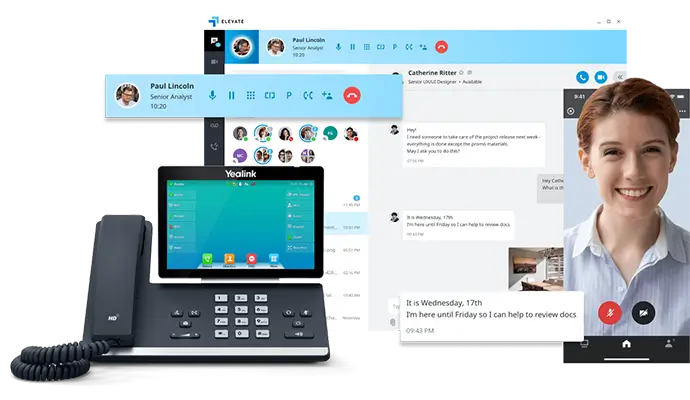
One call, anytime, anywhere!
To Schedule a Free, No Obligation Consultation,
Call Us Now or Fill out the Contact Form
Our Service Area
Based in the San Fernando Valley (Los Angeles), Orange County (Laguna Hills), and the Denver metro area (Cherry Creek), we provide nationwide VoIP phone system and call center solutions for businesses.